
Category: Technology

  • Is Pname Com Facebook Orca Error Annoying You? Here’s How To Resolve It!

    Is Pname Com Facebook Orca Error Annoying You? Here’s How To Resolve It!

    The first question that pops up is what is com.facebook.orca issue? Why is it showing up on my phone? What will it take to resolve these issues? Well, for one, it certainly is needed for the proper functioning of the app. And also acts as your backup.

    Don’t get carried away by rumors or believe all the nonsense circulating online. For example, claims that it contains a virus or malware that disrupts phone functions and makes hacking easier are completely false.

    As a matter of fact, there is a long debate about its utility or usefulness on Android as well as iOS devices. Additionally, we found out through a practical experiment that this type of folder is not at all a virus, and you should not be afraid of it.

    Well, this simple problem is easy to crack; nothing to sweat about. In this article, we will help you clear all your doubts.

    What is com.facebook.orca?

    It’s a common assumption for most people that it is a type of malware or virus with the potential to harm their Android device. Well then, to break it down for you, it is not a virus or malware. The system automatically adds this general function when you install the Facebook app. So from now on, you don’t need to worry about it.

    It is a sort of alias name for the Messenger application, which you install from the Play Store. As a result, a folder named Com.Facebook.Orca on your storage is automatically created. Nothing is startling in it. Refer to the subsequent images to understand it more thoroughly.
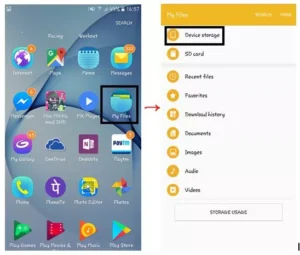
    Is pname com facebook orca Error Annoying You? Here’s how to resolve it!

    It is quite easy to locate it in the file explorer. From there, go to Device Storage or SD Card, and then go to Android, and finally go to Data. Here you will get to your required file.
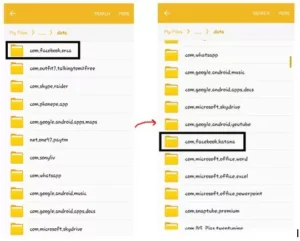
    Is pname com facebook orca Error Annoying You? Here’s how to resolve it!

    Facebook Katana

    At the time of installing this Facebook Messenger app, this “com.facebook.katana” folder will pop up on your Android device.

    Go to File Explorer and then make your way to Device Storage or SD Card. Now go to Android and from there go to the com.facebook.katana folder. Take a look at the image below.
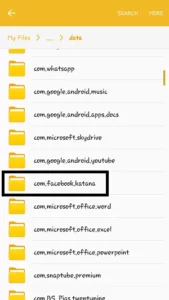
    Facebook Katana

    In this article, we will clarify the confusion regarding the folder’s plan name and whether to remove the folder or not. Moreover, we will give all the details and benefits of having this type of folder on your phone.

    Step by step guide on how to solve Pname Com Facebook Orca

    First, we will focus on the aspect of fixing the Pname Com Facebook Orca error on your Android device. Although they can vary from folder to folder, according to each device. With the help of some easy steps, you can certainly fix the error on your Android device. Nevertheless, if you have other devices, this will help you know how and where to fix them.

    Step 1) Go to the settings app on your Android phone.
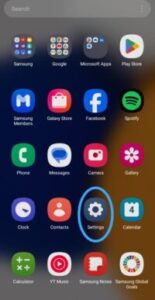
    Go to the settings app on your Android phone.

    Step 2) Now, choose the application folder.
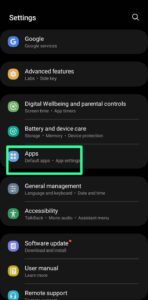
    Now, choose the application folder.

    Step 3) Next, click on the application manager.
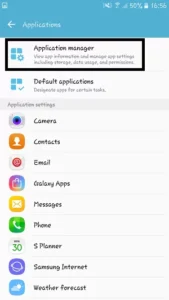
    Next, click on the application manager

    Step 4) Locate your Facebook and Messenger applications on your Android phone.
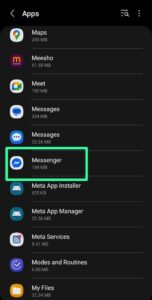
    Locate your Facebook and Messenger applications on your Android phone.

    Step 5) And now you can clear all the data. which is related to the messenger. And restart the applications.
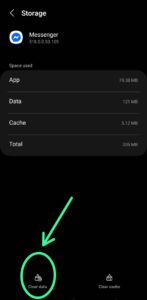
    And now you can clear all the data. which is related to the messenger. And restart the applications.


    We hope that these five steps will help you locate the folders and delete the data safely on your Android device. If the same problem occurs again, then don’t worry. We are here to help you with another solution.

    Lastly, after all this procedure, maybe a pop-up will show that Com.Facebook.Orca has stopped. Then don’t panic, just uninstall Messenger as well as the Facebook applications, and restart your Android device. Now, reinstall those applications from the Google Play Store. We hope that with this solution, your problem is solved now.

    Is it alright to delete the folder com.facebook.orca?

    Some people think that it should remain there, while others don’t agree. In between all this confusion, nobody can find the real solution. So, we will tell you all about whether to delete it or keep it. Deleting this folder is not exactly the ideal solution.

    Because the file will automatically restore on your storage, you will notice an error message flashing on your screen over and over again. Consequently, this folder is a must-have while you run the Messenger application on your Android device.

    Additional Advantage: Your precious data, deleted by your mistake. That will be backed up here. As a result, you never need to worry. About your data getting destroyed forever.

    Now you must be wondering, what if pname com facebook orca stopped working?

    Well, this issue comes up very frequently these days. It’s super annoying and irksome to deal when a reminder that says Facebook has stopped responding every few minutes. If you also have the same issue, then this trouble won’t end ever. So the only way to get rid of this trouble is by not deleting this folder.

    Final Thoughts

    In general, Pname Com Facebook Orca is the package name acting as a backup folder for the Facebook Messenger application on your Android device. Exactly the time when you install the messenger application from the Play Store. Your device automatically creates a folder named “Com.Facebook.Orca” on your storage.

    FAQ’s

    Ques 1) What is Facebook Orca used for?

    Ans) This feature of the Messenger app helps in storing data such as images, files, and videos.

    Ques 2) What is the package name for Facebook Android?

    Ans) Facebook’s package name for the Android App is com. facebook.

    Ques 3) How to access.com Facebook orca?

    Ans) The com. facebook. Orca is located in the Settings app in the media folder.

    Ques 4) What is ORCA software used for?

    Ans) Orca especially provides cloud security abilities. Along with safety from viruses, multi-cloud compliance, cloud workload protection, container security, and more.

    Ques 5) Is it easy to recover lost data through this folder?

    Ans) Yes, it especially recovers lost data, such as doc files, images, and videos..

    Ques 6) Is it alright to delete the Pname Com Facebook Orca folder?

    Ans) It is not a good idea to delete the Pname Com Facebook Orca folder. Because it is a useful addition to the Facebook Messenger app, which stores data.
  • The MyGroundBiz Contractor Portal: Your Gateway to Growth and Success!

    The MyGroundBiz Contractor Portal: Your Gateway to Growth and Success!

    As we know, time is money, and information is power. That’s why we are here, introducing one such platform, MyGroundBiz Contractor Portal, which is known as an all-in-one destination for running a business smarter.

    From accessing critical account information to staying updated on company news, managing business operations, and settlement details, everything you need is just a click away.

    This article provides a comprehensive overview of the MyGroundBiz portal, its features, benefits, login details, and common challenges etc. So, let’s get started, before delaying further!

    What is mygroundbiz portal?

    MyGroundBiz is an online portal designed particularly for FedEx Ground contractors. It serves as a central hub that empowers you to manage your entire business more efficiently.

    How to register for the MyGroundBiz Account?

    The registration process for MyGroundBiz is very straightforward. With some basic information at hand, you can have an account set up in no time:

    Step 1: Go to the BuildAGroundBiz website.

    Step 2: Provide all the necessary information.

    Step 3: Check your e-mail for the verification message and confirm your registration.

    Step 4: Update your profile as needed.

    Step-by-Step Guide on how to log in to the MyGroundBiz Account?

    To access your MyGroundBiz Account successfully, follow the steps below carefully:

    Step 1:Visit the MyGroundBiz website

    Go to the official website of the My Ground Biz portal.

    Step 2: Login

    Enter your username and password. If you don’t have an account, then you need to register first with the required information as mentioned above.

    Step 3: Explore the dashboard

    Once you are logged in, you will be entered into a dashboard where you can access all the features and resources.

    How to reset the password for My Ground Biz account?

    In case you forgot the password for your MyGroundBiz, then you don’t need to worry! Because regaining access is quite simple.

    Step 1: Go to BuildAGroundBiz.com.

    Step 2:Click on the “Forgot Password” option.

    Step 3: Follow the instructions carefully to reset your password.

    Key Features of My Ground Biz Contractor Portal

    MyGroundBiz is more than a login page, where users can run their FedEx business successfully. One can manage delivery operations, track payments, and keep their fleet complaints through this outlet. Here you will find a detailed look at the portal’s key features, each one is built to help you in saving time, staying organized, and maximizing your performance in the business.

    1. Access to FedEx News and Updates

    The News section keeps the contractors informed about FedEx policies, industry changes, and other relevant information. Also, it describes how staying informed helps contractors to adapt to the changes quickly.

    2. Financial Tools and Statements

    The financial section of the MyGroundBiz portal will provide you with access to earnings statements, tax documents, and payment information. Along with this, the portal’s tools help track expenses and manage the cash flow to run your delivery business profitably.

    3. Vehicle & Equipment Maintenance Information

    The vehicle and equipment tracking feature makes the portal even more luring for businessmen. With the help of this feature, contractors can manage maintenance schedules, track repairs, and ensure compliance with FedEx.

    4. Employee & Contractor Resources

    Another prominent feature is its ability to offer resources to manage employee responsibilities, such as onboarding materials, HR guides, and safety protocols. Moreover, the payroll management, hiring guidelines, and employee retention strategies are the other plus points.

    5. Route Information

    Detailed information regarding FedEx routes is easily available on the portal, allowing contractors to plan and manage their delivery schedules. These features that customers to get timely deliveries without any obstacles.

    6. Customer Support And Help Resources

    Help resources such as FAQs, contact information, and online support tools are available for MyGroundBiz contractors. Additionally, mention how they can get assistance with technical issues, account problems, and service inquiries.

    Benefits of MyGroundBiz Portal

    Here are some benefits of using MyGroundBiz Portal:

    1. Efficiency

    MyGroundBiz offers the logistics of running a delivery business, making it easier to manage daily operations. Also, it highlights the importance of efficiency in the delivery industry and how MyGroundBiz supports this.

     2.  Time-Saving Features

    The tools for scheduling, tracking, and business operations help contractors save their precious time. The automation feature, such as reminders for maintenance, assists users in staying informed.

     3. Access to Exclusive FedEx Resources

    It has exclusive resources available for users, such as business trips, educational materials, and industry highlights. Along with this, how to use them incredibly in order to enhance the contractor’s business.

    4. Better Financial Insight

    MyGroundBiz’s financial tools provide contractors with real-time insights into their earnings, expenses, and overall financial health. It also helps them to rely on them to make an informed financial decision for business growth.

    5. Enhanced Communication

    Communication is a fundamental pillar of any business, which can be achieved through this portal. It’s a gateway to improve communication between FedEx Ground and contractors. Additionally, it emphasizes the importance of a platform for providing clear and consistent updates, particularly for an organization as large as FedEx.

    6. Increased Business Transparency

    Besides communication, it’s a doorway to achieving transparency in performance payments and compliance status. Moreover, the incredible tools assist you in delivering operational efficiency.

    Common Issues Related to MyGroundBiz Account

    Well, the challenges to the account login are commonly observed. To overcome these, make sure:

    • You are using a compatible browser such as Chrome, Microsoft Edge, etc.
    • Open the correct login page: https://mybizaccount.fedex.com
    • Keep your FedEx ID and password updated.
    • Contact the help desk for technical issues from Monday to Friday during business hours by calling (1-800-435-7647) or 1-800-HELPMIS.

    What is the difference between a My Ground Biz account and My Ground Biz account?

    Most of the time, users get confused with both terms, so let’s break it to you that there is a huge difference between the two, as mentioned in the table below:

    Feature MyGroundBiz MyGroundBiz account
    Purpose Public portal for FedEx Ground contractors Designed for a specific FedEx contractor company & its authorized users
    Access Available for all FedEx Ground contractors Only registered contractors can access it
    Login Credentials FedEx ID/ e-mail and general password FedEx ID+ unique password (different from MyGroundBiz)
    Content Type General content: news, vendor info, truck sales, success stories Company-specific data: financials, settlement reports, e-Forms, HR tools
    Security Level Standard High, as it contains sensitive information

    Wrapping Up

    The MygroundBiz serves as a vital hub for users, from contract management to shipment tracking. The real-time access to settlements, routes, and important company data empowers businesses to operate more effectively and stay aligned with FedEx standards.